
Project Overview
Lorenzo’s Pizza is a local restaurant ordering website where users browse menus, customize pizzas, choose pickup or delivery, and complete checkout through mobile devices.
Unlike third-party platforms such as Uber Eats, Lorenzo’s offers lower prices and greater customization flexibility, including half-and-half pizza configurations.
The checkout experience reflects older web-based interaction patterns that create friction for modern mobile users.
Project
Simplifying a Legacy Mobile Checkout Experience
Role
UX/UI Designer
Duration
3 Days
Tools
Figma
The Problem
The existing mobile checkout flow works, but it creates unnecessary friction before users can complete their order.
Too much information too early
Users are asked to enter personal information before they have fully committed to the order.
Checkout flow feels fragmented
Multiple screens, repeated confirmations, and page transitions interrupt ordering momentum.
Payment happens too late
The current flow relies on legacy form-based payment and does not support modern mobile payment expectations.
These issues increase cognitive load and make the direct ordering experience feel less competitive compared with modern food ordering platforms.
Design Goal
Reduce checkout friction while preserving Lorenzo’s direct-ordering advantages.
Research Findings
To better understand the sources of checkout friction, I evaluated the existing flow using heuristic evaluation, cognitive walkthroughs, and competitive analysis.
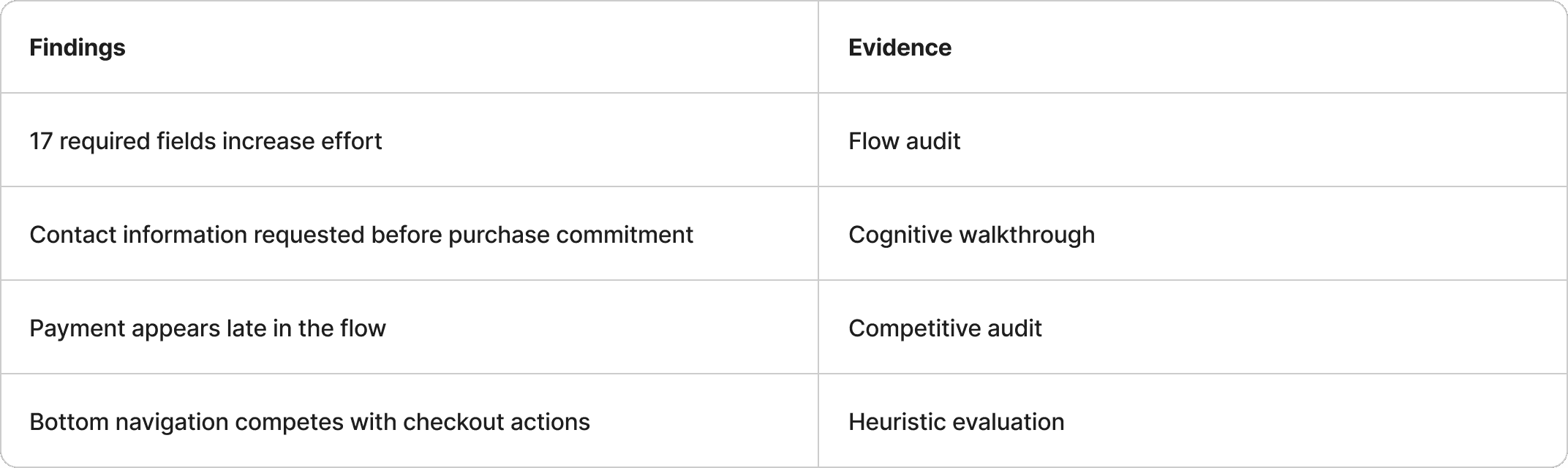
These findings suggest that friction is created not by pizza customization itself, but by the checkout structure surrounding it.
Key Insights
Users provide information after commitment
Users are willing to provide information after committing to an order.
Friction weakens direct-ordering value
Checkout friction weakens the direct-ordering advantage.
Design Opportunity
How might we reduce checkout friction while preserving the flexibility and value of direct ordering?
Design Strategy
Strategy 1 - Simplify the Flow
Reduce unnecessary steps and required fields to preserve ordering momentum.
Problem
Users must move through multiple screens before reaching payment.
Decision
Remove unnecessary steps and consolidate related actions.
Outcomes
Reduced required fields from 17 to 7 and shortened the checkout path.
Before
6 screens 17 required fields

After
5 screens 7 required fields

Strategy 2 - Progressive Disclosure
Request information only when it becomes necessary.
Problem
Users are asked for personal information before committing to an order.
Decision
Delay information collection until after payment method selection.
Outcomes
Reduces perceived effort and keeps users focused on completing the order.
Before


After

Strategy 3 - Modern Payment Experience
Support wallet-based payment methods that reduce manual input.
Problem
Legacy payment forms require excessive manual input on mobile devices.
Decision
Introduce Apple Pay and wallet-based payment options as primary payment methods.
Outcomes
Reduces typing effort and aligns the checkout experience with modern mobile payment behaviour.
Before
Payment was limited to legacy form-based checkout

After
Wallet-based and flexible payment options were introduced
Final Mobile Checkout Flow
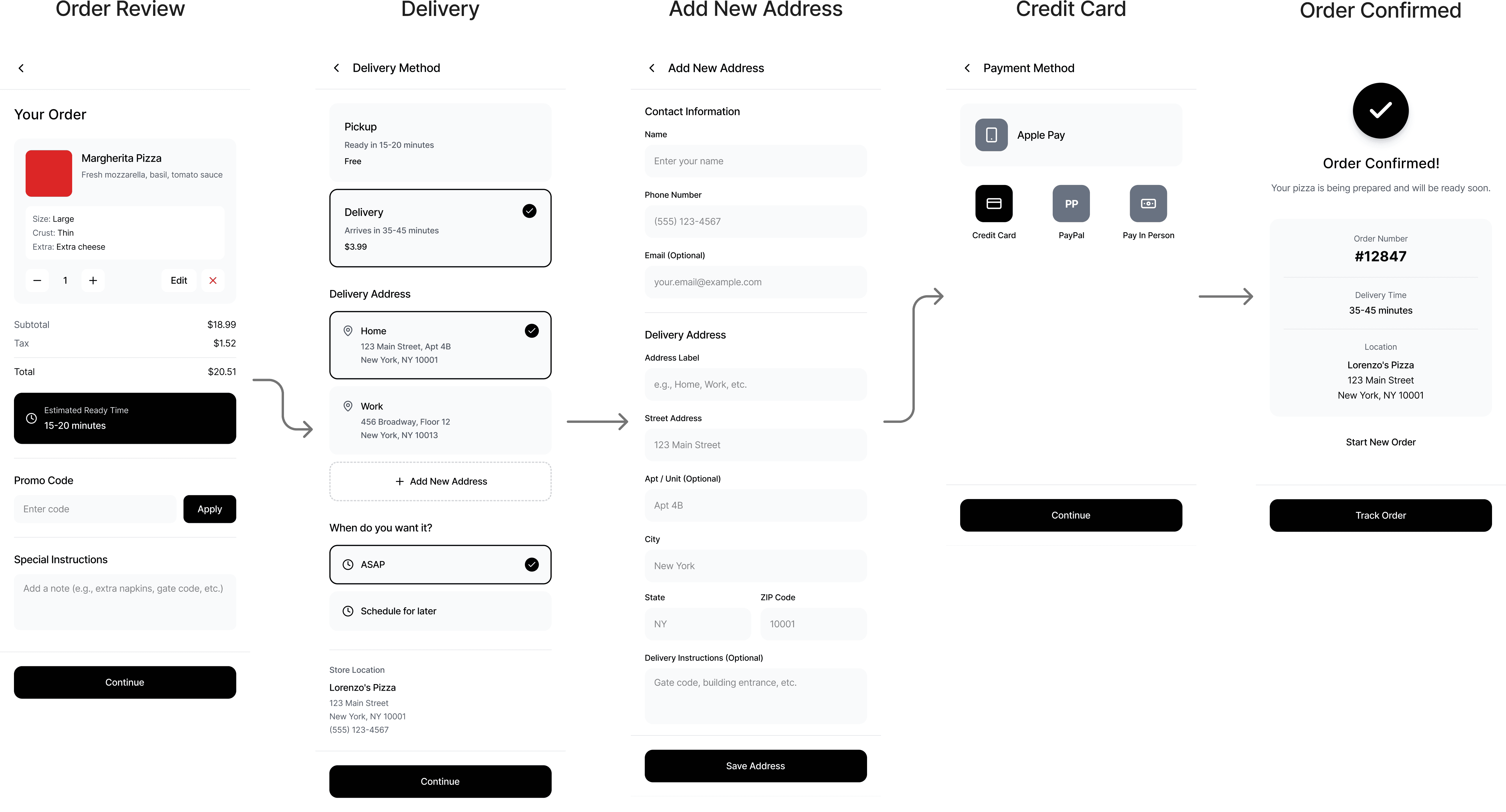
The redesigned checkout experience reduces friction by simplifying the flow, delaying information collection until necessary, and supporting modern payment methods.
Main User Journey: Pickup + Apple Pay

Alternative User Journey: Delivery + Credit Card
Key Improvements
The redesigned experience reduces unnecessary friction, minimizes manual input, and better aligns the checkout flow with modern mobile ordering expectations.

Reflection
This project reinforced an important lesson:
Many usability issues are not caused by missing features, but by how information and decisions are structured throughout the experience.
By reducing unnecessary effort and aligning the flow with mobile payment behaviour, the checkout experience becomes more focused and easier to complete.